Averaging and Sweeping
This section introduces the averaging and parameter sweeping capabilities of LabOne Q. Quantum experiments performed using LabOne Q generally rely on nested loops, which control how results are averaged and how parameters are swept over, referred to here as “acquisition loops” and “sweeps”, respectively.
We discuss the implementation of acquisition loops and sweeps below. Then, we present the timing paradigms utilized by LabOne Q (sample-precise real-time execution and near-time execution) and provide timing recommendations for experiments. Finally, we outline how to generalize sweeps to n-dimensions.
For a short hands-on demonstration, also have a look at our tutorial video
The Real-Time Acquisition Loop
The real-time acquisition loop (acquire_loop_rt) is the fundamental
building block of an experiment definition in LabOne Q. Each measurement
of a qubit state with a Zurich Instruments Quantum Analyzer must be
executed within a real-time acquisition loop. The real-time acquisition
loop specifies:
- The number of recorded averages
- The averaging mode, which defines whether nested sweeps are executed in a cyclic or sequential manner
- The acquisition mode of the Quantum Analyzer
- The repetition mode, which governs the repetition rate of the acquisition loop
The Number of Averages and the Averaging Mode
The number of averages n specifies how often the acquisition loop is executed.
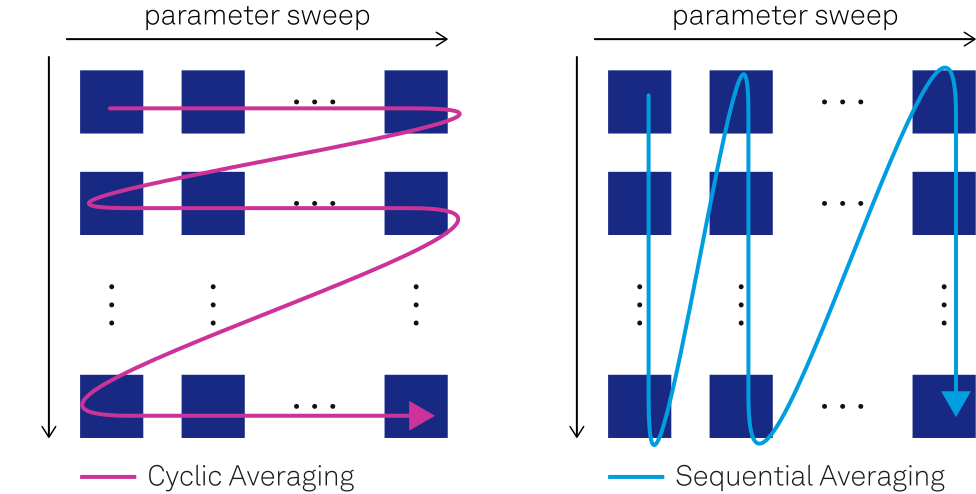
The averaging mode differentiates between cyclic averaging and sequential averaging and determines in which order the parameter sweeps within a real-time acquisition loop are executed.
- Cyclic averaging: A parameter sweep is fully executed and then repeated n times. This is the default mode and is useful for averaging out temporal drifts.
- Sequential averaging: The sequence within a parameter sweep step is executed n times before proceeding with the next sweep steep, i.e., n times with the first parameter step, then n times with the second parameter step, and so on.
- Single shot: Used when acquiring single shot data. No averaging is applied to the data, and cyclic averaging is assumed if a parameter sweep is contained within the acquisition loop. In this mode it is still possible to specify the number of averages, which will then be reflected in the number of single shot data points per sweep point that are acquired and returned.
The Acquisition Mode
The acquisition mode of the Quantum Analyzer specifies how the qubit state is measured.
- RAW: The acquired time-domain data is returned directly after conversion to a digital signal. Only allows a single acquire event within the averaging loop of the experiment and is limited to 4096 samples.
- SPECTROSCOPY_IQ or simply SPECTROSCOPY: Demodulates and integrates the acquired signal using the oscillator frequency. Used to obtain a frequency spectrum to characterize the response of resonances.
- SPECTROSCOPY_PSD: Calculates the power spectral density (PSD) of the acquired response signal directly on hardware.
- INTEGRATION: Demodulates and integrates the acquired signal using
precalculated weighting vectors (kernels) specified in the
acquirecommand. Supports integration vectors with up to 4096 points. - DISCRIMINATION: Performs the same integration as above but directly returns the integer index of the measured qubit state.
Adding Wait Times After Readout Pulse Playback on SHFQA Instruments
With LabOne 24.10, SHFQA instruments enforce appropriate wait times after the completion of any readout pulse to prevent holdoff errors when waveform playback and integration triggers are too fast. This results in minimum repetition periods for subsequent acquisitions on a single SHFQA readout channel, depending on the configuration of the result logger and the mode of operation:
- Result Logger Enabled (Integration or Discrimination Mode) in Single Shot Mode: 440 ns.
- Result Logger and Averaging Enabled (Integration or Discrimination Mode): 1.096 μs.
- Result Logger Not Enabled (Raw Mode): 20 ns.
Please note that a holdoff time or gap between subsequent acquisitions, of 20 ns is always required.
The Repetition Mode and Execution Timing
By default, LabOne Q attempts to execute the contents of the real-time acquisition loop as fast as possible. However, it may be advantageous to run experiments with a fixed repetition rate, to make timing and subsequent instrument programming less complex. To accommodate these use cases, LabOne Q provides the following options:
- Fastest execution: The experiment is executed as fast as possible, and
the repetition rate might vary over the experiment’s course:
repetition_mode=RepetitionMode.FASTEST - Fixed repetition rate: The experiment is executed with a fixed time per shot
- Repetition rate specified by the user:
repetition_mode=RepetitionMode.CONSTANT, repetition_time=5e-6 - Repetition rate calculated by LabOne Q: Guarantees the fastest
possible execution of the experiment, while keeping a fixed
repetition rate:
repetition_mode=RepetitionMode.AUTO
Note
Please be aware that both acquire_loop_rt and sweep are sections with special properties.
Therefore, all the following rules apply to them.
Parameter Sweeps
In a parameter sweep, a parameter is successively varied over a range of values. In quantum experiments, such sweeps are used together with the real-time acquisition loops described above.
In LabOne Q, linear and arbitrary parameter sweeps can be represented with the LinearSweepParameter and SweepParameter classes, with the following arguments.
sweep_parameter_1 = LinearSweepParameter(
  uid="amplitude",
  start=start,
  stop=stop,
  count=count
  )
sweep_parameter_2 = SweepParameter(
  uid="arbitrary",
  values=some_numpy_array
  )
Within an Experiment, the sweep syntax is used to execute a parameter sweep, as in this
simplified example:
## real time acquisition loop
with exp.acquire_loop_rt(
  uid="shots",
  count=2**8,
  acquisition_type=AcquisitionType.INTEGRATION
  ):
    ## real-time parameter sweep
    with exp.sweep(uid="sweep",
                    parameter=sweep_parameter_1,
                    execution_type=ExecutionType.REAL_TIME,
                    alignment=SectionAlignment.RIGHT
                    ):
        exp.play(signal="q0_drive", pulse=x90)
        exp.delay(signal="q0_drive", time=sweep_parameter_1)
        exp.acquire(signal="acquire", handle="acq_0", kernel=readout_weighting_function)
Besides the sweep parameters, the sweep command also accepts arguments
regarding the execution type (real time or near time) and the alignment
of the sweep content (left or right).
Note
A near-time sweep section cannot be defined within the real-time boundary defined by the acquisition loop.
Real-Time and Near-Time Sweeps
While some parameter sweeps, such as the delay time sweep in a Ramsey experiment, rely on sample-precise execution in real time, other sweeps can be executed only in near time. This is the case when a swept property cannot be accessed by the sequencer of the involved instruments, for example, when the frequency of a hardware oscillator on the HDAWG is changed, or when a third-party instrument is used in the experiment.
Note
Typical experiments that use real-time parameter sweeps are Amplitude Rabi sweeps, T1 measurements, and Ramsey sweeps.
Experiments that use near-time sweeps are the readout resonator spectroscopy and the pulsed qubit spectroscopy.
When near-time sweeps are used, it is not necessary to set the sweep parameter within the definition of the experimental sequence. Rather, it can be assigned directly to the setup configuration, as shown in this simplified example:
sweep_parameter = LinearSweepParameter(
    uid="frequency", start=start, stop=stop, count=count
)
device_setup.logical_signal_groups["q0"].logical_signals[
    "measure_line"
].oscillator.frequency = sweep_parameter
With the resulting combination of sweep and real-time acquisition loop:
with exp.sweep(
    uid="sweep", parameter=sweep_parameter, execution_type=ExecutionType.NEAR_TIME
):
    with exp.acquire_loop_rt(
        uid="shots", count=2**8, averaging_mode=AveragingMode.SEQUENTIAL
    ):
        with exp.section(uid="qubit_excitation"):
            exp.play(signal="drive", pulse=const_iq_100ns)
Note that the averaging mode of the real-time acquisition loop does not play a role in this example, as it would influence only sweeps within the real-time loop, but not those around it.
Simultaneous Parameter Sweeps
It is possible to sweep two parameters with the same number of steps simultaneously, by grouping them in a list. This works both for near-time and for real-time sweeps.
## define two sweep parameters with the same number of steps
sweep_parameter_1 = LinearSweepParameter(uid="delay_1", start=0, stop=1e-6, count=11)
sweep_parameter_2 = LinearSweepParameter(uid="delay_2", start=0, stop=5e-6, count=11)

with exp.sweep(uid="sweep", parameter=[sweep_parameter_1, sweep_parameter_2]):
    with exp.section(uid="qubit_excitation"):
        exp.play(signal="q0_drive", pulse=x90)
        exp.delay(signal="q0_drive", time=sweep_parameter_1)
        exp.play(signal="q0_drive", pulse=x90)
        exp.delay(signal="q0_drive", time=sweep_parameter_2)
        exp.play(signal="q0_drive", pulse=x90)
n-Dimensional Sweeps
Parameter sweeps can also be extended to n dimensions, by nesting them:
## define two sweep parameters, they do not need to have the same number of steps
sweep_parameter_1 = LinearSweepParameter(uid="delay", start=0, stop=1e-6, count=11)
sweep_parameter_2 = LinearSweepParameter(uid="amplitude", start=0.1, stop=1, count=37)

with exp.sweep(uid="sweep1", parameter=sweep_parameter_1):
    with exp.sweep(uid="sweep2", parameter=sweep_parameter_2):
        with exp.section(uid="qubit_excitation"):
            exp.play(signal="q0_drive", pulse=x90)
            exp.delay(signal="q0_drive", time=sweep_parameter_1)
            exp.play(signal="q0_drive", pulse=x90, amplitude=sweep_parameter_2)
The QCCS session takes care of the correct ordering of the acquired results and returns them via the results object.
Finally, sweeps in n-dimensions can be defined both in near time and in real time, or in a combination of the two. Note that within a real-time sweep or real-time acquisition loop, only real-time sweeps can be nested further.
Non-Linear, Real-Time Frequency Sweeps
Since version 25.10.0, LabOne Q supports non-linear frequency sweeps in real-time, that enable arbitrary frequency patterns within the real-time sequence. This is particularly useful for logarithmic sweeps, custom frequency sequences like when addressing higher levels of non-linear system, or higher-resolution sampling around specific frequencies of interest.
Creating Non-Linear Frequency Sweeps
Non-linear frequency sweeps are created using SweepParameter with an arbitrary array of frequency values:
import numpy as np
from laboneq.simple import SweepParameter

# Logarithmic frequency sweep spanning multiple decades
log_frequencies = np.logspace(np.log10(50e6), np.log10(500e6), 100)
freq_sweep_log = SweepParameter(
    uid="log_frequency_sweep",
    values=log_frequencies
)

# Custom frequency pattern with dense sampling around a feature
center_freq = 6.8e9
custom_frequencies = np.concatenate([
    np.linspace(6.0e9, center_freq - 50e6, 25),      # Coarse below
    np.linspace(center_freq - 50e6, center_freq + 50e6, 100),  # Dense around center
    np.linspace(center_freq + 50e6, 7.6e9, 25)      # Coarse above
])
freq_sweep_custom = SweepParameter(
    uid="custom_frequency_sweep",
    values=custom_frequencies
)

# Arbitrary frequency sequence (e.g., from theoretical predictions)
arbitrary_freqs = np.array([6.7e9, 6.85e9, 6.72e9, 6.9e9, 6.75e9])
freq_sweep_arbitrary = SweepParameter(
    uid="arbitrary_frequency_sweep",
    values=arbitrary_freqs
)
Applying Non-Linear Frequency Sweeps
Non-linear frequency sweeps are applied to oscillator frequencies in the same way as linear sweeps:
from laboneq.dsl.calibration import Oscillator, SignalCalibration
from laboneq.core.types.enums import ModulationType

# Apply logarithmic frequency sweep to a hardware oscillator
device_setup.logical_signal_groups["q0"].logical_signals[
    "drive_line"
].calibration = SignalCalibration(
    oscillator=Oscillator(
        frequency=freq_sweep_log,
        modulation_type=ModulationType.HARDWARE
    )
)
Hardware Support and Performance
Supported Devices: - SHFSG/SHFQA/SHFQC: Full support for non-linear sweeps up to device memory limits - HDAWG: Supports non-linear sweeps with a maximum of 512 frequency steps
Performance Characteristics:
- Linear Sweeps: Use optimized hardware functions (configFreqSweep), minimal sequencer memory
- Non-Linear Sweeps: Individual frequency setting per step, higher memory usage but full flexibility
Automatic Optimization
LabOne Q automatically detects when a SweepParameter contains values that form a linear sequence (within 1 mHz tolerance) and optimizes them as linear sweeps for better performance.